Group party game

Truth or Dare for Parties

Add the players, choose the type of round and generate a random person with a party-ready prompt.

Enter one name per line.

4 unique players

100 Truths • 100 Dares

Round type

Optional player tracker

Track whose turn it is and the rounds each player completes. These are turn counts, not scores.

Party round

🎉

Your first party round will appear here.

4 players · Truth or Dare

Recent rounds

No rounds yet.

Party game

How to use Truth or Dare for Parties

A party host tool that selects a player and a Truth or Dare prompt, then tracks previous rounds.

Truth or Dare for Parties combines a random player picker with a large party prompt library. A host can enter names and choose Random, Truth-only or Dare-only rounds without passing around a separate list.

Use no-repeat mode for longer sessions and the recent-round history to track who received each prompt. The Clear button removes only history, while Reset starts the current setup again predictably.

  1. 1

    Enter the party players, one name per line.

  2. 2

    Choose Truth, Dare or Random mode.

  3. 3

    Generate a round and pass the device to the selected player.

Truth or Dare for Parties: Setup and Example Results

These captures show the current English controls on desktop and phone. Follow the steps below each image; your random results will vary. Select an image to view it at full size.

Set up on desktop

Truth or Dare for Parties: desktop setup and controls
Enter the players and choose Random, Truth or Dare. Enable No repeated prompts for a varied session.

Read the result

Truth or Dare for Parties: completed example and available controls
Generate party round to choose a player and prompt. Recent rounds holds earlier draws. Mark a completed round or pass separately in the optional tracker.

Use it on a phone

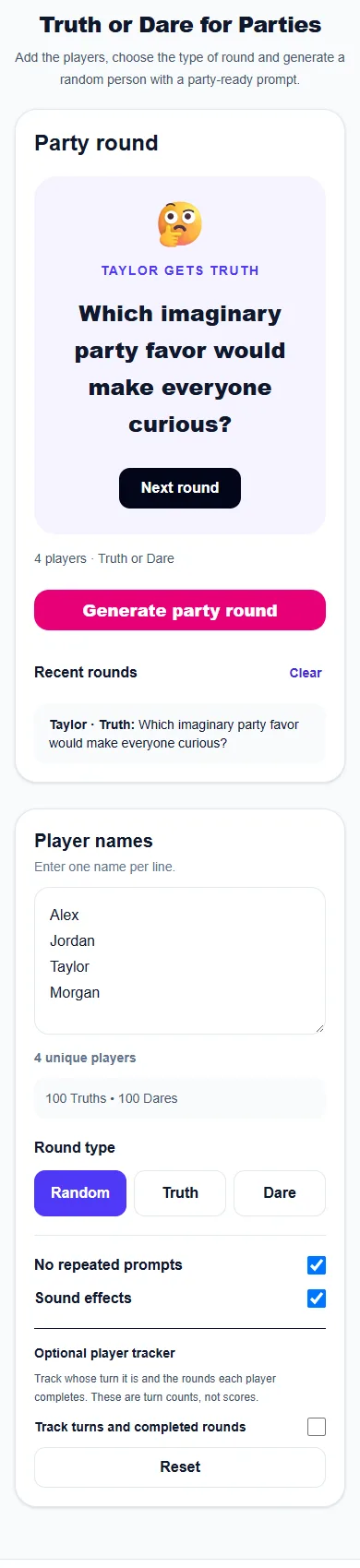
Truth or Dare for Parties: phone layout with a completed example
On a phone, the tool and controls stack vertically. Generate party round to choose a player and prompt. Recent rounds holds earlier draws. Mark a completed round or pass separately in the optional tracker.

Real examples

  • Break the ice at a birthday party.
  • Run quick rounds at a house party.
  • Use Truth-only mode for a calmer group.

Best ways to use it

  • Birthday parties
  • House parties
  • Large group icebreakers

Frequently asked questions

Can I add player names?

Yes. Enter one player per line and the tool selects from that list.

Can I choose only Truths or only Dares?

Yes. Select Truth, Dare or Random before generating a round.

Does the tool keep a history?

Yes. Recent rounds appear under the controls and can be cleared at any time.

Can I track completed rounds and passes?

Enable Track turns and completed rounds below Sound effects. The tracker uses the player names entered above and follows the player selected by the game. Mark Completed round or Pass round to record their response; generate or spin again to choose another player. Counts clear on refresh and Reset rounds clears only these counts.

More from Spinning My Wheel

Explore Our Main Tools

Jump to another main picker when you need names, decisions, party prompts, or random numbers.